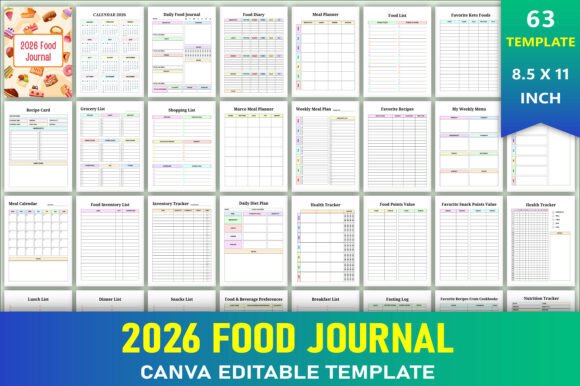
Editable 2026 Food Journal
Staying intentional about what you eat doesn’t mean sacrificing flexibility—or your time. The Editable 2026 Food Journal bridges purpose and practicality: a fully customizable, print-ready digital planner designed for real life in 2026—not just another static PDF. Whether you’re tracking macros, managing food sensitivities, meal prepping for a busy week, or building a branded wellness resource for clients, this journal adapts to your rhythm, not the other way around.
More Than a Template—A Toolkit You Own
Unlike rigid planners locked in fixed layouts, the Editable 2026 Food Journal ships with layered, editable files—including JPG, PNG, and PDF formats—plus a direct Canva link that opens into a live, drag-and-drop workspace. That means no design skills required. Swap fonts in seconds. Adjust color palettes to match your brand or mood. Resize sections to prioritize breakfast planning over snack logging—or vice versa. Add your logo to the “Belongs To” page. Insert seasonal produce photos into the grocery list. Even restructure the weekly meal planner grid to fit your family’s three-meal-or-five-snack reality.
This isn’t just convenience—it’s control. You decide how much (or how little) structure supports your goals. A nutrition coach can white-label it for client onboarding. A café owner might adapt the “What’s for Lunch” and “Food Inventory” pages for staff shift handoffs. A homeschooling parent could simplify the “Daily Food Journal” into a visual check-in for kids using emoji-based hunger/fullness cues.
Real-World Use Across Roles and Routines
Professionals juggling deadlines and dietary goals find the Editable 2026 Food Journal cuts friction—not corners. The integrated 2026 calendar and monthly spreads let you batch-plan meals during Sunday prep *and* align them with upcoming travel, meetings, or deadlines. The “Meal Calendar” and “My Weekly Menu” pages work together: block out dinners before the week starts, then auto-populate ingredients into the “Shopping List” and “Grocery List”—no manual copying.
For creators and entrepreneurs, this journal doubles as a content engine. Bloggers use the “Recipes to Try” and “Favorite Recipes” sections to curate seasonal roundups. KDP publishers drop the ready-to-upload interior directly into Amazon’s Kindle Direct Publishing system—no formatting surprises, no bleed-line guesswork. The high-resolution PDF meets KDP’s print specs out of the box, including correct margins, CMYK-safe colors, and crisp 300 DPI text rendering.
Educators and health coaches appreciate how easily it scaffolds learning. The “Foods To Avoid And Allergies” and “Things To Avoid” pages become collaborative tools during intake sessions. “Food Points Value” and “Macro Meal Planner” support habit-building without overwhelming beginners. Even the “Food Beverage Preferences” and “To Remember” sections invite reflection—not just logging—making behavior change feel human, not clinical.
Thoughtful Design, Not Just Pretty Pages
Every section serves a functional purpose—no filler. The “Food Calories List” includes common portion sizes (e.g., “½ cup cooked quinoa = 111 cal”), not vague estimates. The “Favorite Keto Foods” and “Snack Ideas” lists are vetted for realistic pantry accessibility—not just theoretical ideals. The “Recipe Card” layout leaves space for handwritten notes like “doubled spices,” “subbed almond milk,” or “kids ate ¾.”
And because consistency depends on usability, the layout avoids cognitive overload. Daily entries use clear, spacious lines—not cramped grids. The “Food Diary” separates timing (breakfast/lunch/dinner/snack), food, portion, and notes—so patterns surface faster. Even small touches matter: the “Breakfast List” and “Dinner List” include checkboxes *and* blank lines, honoring both routine eaters and explorers.
Smart Customization Starts With Intention
Before diving into Canva, ask yourself: What’s the primary job this journal needs to do *this year*? If you’re launching a wellness program, emphasize branding—swap neutral tones for your signature palette and embed your URL in the “Belongs To” page. If you’re managing IBS or diabetes, highlight the “Foods To Avoid” and “Food Inventory” sections—resize them, add icons, or duplicate pages for different symptom trackers.
Keep file hygiene simple. Save your Canva edits as new versions (“2026_FoodJournal_Keto_V2”, “2026_FoodJournal_ClientKit”) rather than overwriting originals. When exporting for print, choose PDF (Print) over PDF (Standard) in Canva to preserve bleed and crop marks. For KDP, double-check that all text is outlined or embedded—and that no images exceed 10 MB.
Why This Stands Out in a Crowded Space
Most food journals fall into two camps: overly complex (with 47 niche trackers nobody uses past Week 2) or oversimplified (just a blank table with “Food” and “Time” headers). The Editable 2026 Food Journal lives in the productive middle—structured enough to build habits, flexible enough to evolve with them.
It respects your time by eliminating redundant steps: no retyping recipes into separate apps, no rebuilding calendars each January, no wrestling with mismatched fonts when printing. It respects your goals by giving you agency—not algorithms. You decide which metrics matter. You choose whether “points,” “macros,” or “mindful bites” guide your day. And because it’s yours to edit, it grows with your understanding—not against it.
Ready When You Are
You don’t need to wait for motivation to strike. Download the Editable 2026 Food Journal instantly. Open the Canva link. Change one color. Fill in your name on the “Belongs To” page. That’s your first act of ownership—and the quietest, most powerful step toward consistent, joyful, intentional eating in 2026.